A key that lives in your pocket is easy to lose. A lock that lives on your phone is much harder to misplace. That is the basic idea behind smart door locks for the home, and it is why they have gone from nice-to-have gadgets to essential security tools.
If you have ever driven back to check if you locked the door, fumbled for keys with groceries in your arms, or worried about kids coming home to an empty house, a smart lock directly solves those problems for you.
What smart door locks for the home actually do
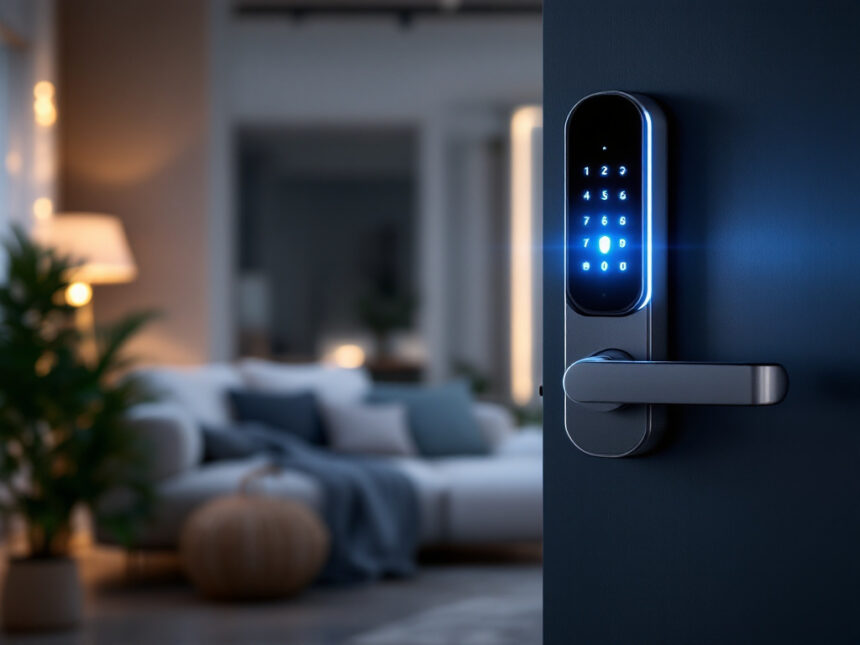
Smart door locks replace or upgrade your existing deadbolt so you can lock and unlock your door without a physical key. Most let you use:
- A smartphone app
- A keypad code
- A fingerprint reader, on some models
- Voice commands through a smart speaker
Modern smart locks connect to your Wi‑Fi, so you can control them from anywhere with an internet connection. As of 2026, this kind of remote access is standard on many models, whether you are looking at full deadbolt replacements or retrofit locks that keep your existing hardware.
Some systems, like Vivint Smart Locks, let you assign up to 50 individual access codes for family members, guests, and house staff. That means you can stop cutting spare keys and start managing access from your phone instead.

Everyday convenience you notice on day one
The first change you feel with a smart lock is simple convenience. You are not overhauling your whole security system yet, you are just making the most used door in your home much easier to live with.
No more key chaos
You can arrive home with a sleeping baby or a week’s worth of groceries and unlock your door with a quick tap in the app or a short keypad code. If your lock supports fingerprint access, you can simply touch the pad and walk in.
Smart locks also eliminate many little hassles:

- You are much less likely to get locked out
- You can retire that overstuffed keychain
- You no longer need to hide a spare under the mat
And if your smart lock still supports a physical key, you keep a backup option without having to rely on it every day.
Easy access for kids, guests, and helpers
If your children come home from school before you, you can give each of them a unique code. They do not need to carry keys, and you can see when they arrive by checking the lock activity in the app.
The same setup works for dog walkers, cleaners, or visiting relatives. Many smart locks allow:
- Permanent codes for household members
- Temporary codes that expire after a set date
- Scheduled codes that only work during certain hours
This is much more flexible than physical keys, and it is easy to change or delete a code whenever you need to.
Real security benefits, not just gadgets
Convenience is nice, but the main reason you need smart door locks for home is security. A good smart lock tightens control over the main entry point to your house in ways a regular lock cannot match.
Stronger protection at the door
Top brands like ADT build in protection against common lock picking tricks. ADT smart door locks include patented bump guard technology that helps defend against lock bumping, which is a technique thieves use on traditional pin tumbler locks.
On the digital side, many smart locks use advanced security tools such as:
- 128 bit AES encryption to protect digital keys and commands
- Secure wireless protocols like Z‑Wave to reduce interference and attacks
- Two factor authentication in their apps so no one can log in with just a stolen password
These are the same kinds of protections that modern smart home security systems rely on. Properly set up, a smart lock can be harder to defeat than a basic mechanical deadbolt, especially when it is part of a larger smart security system integration.
Clear visibility into who comes and goes
Smart locks can send real time notifications to your phone whenever someone locks or unlocks the door. This kind of logging is useful if you:
- Want to confirm your kids made it home
- Need to check that a cleaner or contractor actually arrived
- Share a home with roommates and want a simple way to track entries
Many systems show a timeline of each event, tagged with user names instead of just “unlocked”. When each person has their own code or app login, it becomes easy to see who was there and when.
Combined with smart security cameras for home or a smart home video doorbell, you can also see a live view of your door when someone enters, which adds another layer of accountability.
How smart locks fit into your whole smart home
A smart lock becomes much more powerful when it works together with your other smart devices. This is where features from your research really come into play.
Working with cameras, doorbells, and sensors
When you integrate a smart lock with your overall system, you can:
- See who is at your door through an outdoor or doorbell camera
- Talk to them from your phone
- Decide whether to unlock the door remotely
For example, Vivint Smart Locks can pair with doorbell and outdoor cameras so you can see and speak to visitors before you let them in. ADT smart locks also connect to home Wi‑Fi and the wider security system, which lets you check lock status and control it from anywhere with internet access.
Paired with smart security sensors or smart window sensors, you can set up simple automations. Some systems allow emergency rules, such as automatically locking doors when motion is detected at night or when your alarm arms.
If you are just starting to build a system, look at bundled smart home security packages or wireless home security systems that already include a smart lock, cameras, and a hub. They are usually easier to set up and maintain than buying each piece separately.
Voice and app control for daily routines
Many smart locks support voice assistants such as Google Home and Siri. That lets you say things like:
- “Hey Siri, lock the front door” as you head to bed
- “Hey Google, is the back door locked” when you are already on the couch
Smart locks for homes that connect directly to Wi‑Fi also let you check and control your door through the app even when you are away. As of 2024, this kind of remote access is standard on many mid range and premium models.
If you already use smart home security automation for things like lights and thermostats, adding a smart lock lets you tie your entry and exit into your routines. For instance, locking the door could also arm your smart home alarm systems or your best smart alarm systems pick.
Are smart door locks safe from hacking
Security questions around smart locks are valid. You are placing a connected device on the front door of your home, so you want to be sure it is properly protected.
How modern smart locks defend against attacks
Manufacturers address digital threats through several layers:
- 128 bit AES encryption or similar standards for all communication
- Secure wireless protocols like Z‑Wave or carefully managed Wi‑Fi connections
- Options for app based two factor authentication
ADT smart door locks, for example, use industry standard 128 bit encryption to secure digital keys and any data that moves between your lock and its app or hub.
To protect your own system, you should also follow best practices from guides like how to secure smart home devices. These typically include:
- Updating lock firmware regularly
- Choosing unique, strong passwords for your smart home apps
- Enabling two factor authentication wherever it is available
- Considering professional installation if you are not confident doing it yourself
It is also wise to choose locks with high ANSI grade ratings and strong encryption, as suggested in security advice from leading home security providers. This combination makes it significantly harder for someone to break in electronically compared with a basic, old style deadbolt.
What happens if Wi‑Fi or power goes out
Smart locks need power, usually from replaceable batteries. Wi‑Fi models can also be affected by network or power outages. Good systems plan for both situations:
- Most send low battery alerts to your phone before power runs out
- In a failure, they typically stay in their last locked or unlocked state
- You can still use a physical key or keypad in most cases
ADT notes that their smart locks remain operable with a physical key or keypad even in the event of a battery failure or internet outage, which is a useful baseline to look for when you compare options.
You get the day to day benefits of connectivity without losing the basic reliability of a traditional lock.
Quick rule of thumb: if a smart lock does not offer strong encryption, a clear backup way in, and regular update support, it does not belong on your front door.
Options for owners, renters, and budgets
You do not need to own a large house to benefit from a smart lock. There are good options whether you have a single apartment door or a multi entrance home.
Homeowners and families
If you own your home, you can usually choose a full deadbolt replacement. Models like the Yale Assure Lock 2 are frequently rated among the best smart locks for 2026, with built in Wi‑Fi, compatibility with Apple HomeKit, Alexa, and Google Assistant, and optional Apple Home Keys for iPhone users.
You might also consider:
- The Schlage Arrive Smart WiFi Deadbolt, praised by Wirecutter for easy installation, tactile keypad buttons, and robust security in its 2024 review
- The Aqara Smart Lock U100 if you are deep in the Apple ecosystem and want Apple Home Key plus strong fingerprint performance
Families with kids often appreciate locks that support many access codes or fingerprints, so each person gets their own way in and you can keep a detailed activity log.
Renters and apartment dwellers
If you rent, you may not be allowed to change the entire lock. There are still smart options that are friendly to apartments:
- Retrofit locks like the August Wi‑Fi Smart Lock that attach to the interior side of your existing deadbolt while leaving the exterior keyhole untouched
- Exterior add ons like the Yale Approach Lock with Wi‑Fi + Keypad that work with standard single cylinder deadbolts
These help you get app and keypad control without permanently altering the door. Be sure to confirm with your property owner before any installation. For more ideas tailored to your situation, you can explore smart home security for apartments and smart home security for renters.
Working within a budget
Smart locks cost more upfront than basic mechanical locks, especially models with Wi‑Fi and integrated cameras. Budget friendly models like the Ultraloq U‑Bolt Pro with Wi‑Fi try to balance durability, an IP65 rating, a fingerprint sensor, and good wireless performance at a lower price, though you may give up features such as Apple Home support.
If you are building a system in stages, it might help to:
- Identify your must have features such as keypad, app control, fingerprint, voice support
- Decide whether you want a retrofit or full replacement
- Compare options in wider smart home security reviews and top smart home security brands guides
You can also look at best budget smart home security resources to see where a smart lock fits into an affordable but capable setup.
How a smart lock fits into your bigger security plan
A smart lock is one piece of home security, not the entire picture. To get the full benefit, plan how it fits with other devices and habits.
You might:
- Pair it with a smart home video doorbell for visual verification
- Add smart water leak detectors and cameras as you expand your system
- Use diy smart home security kits if you prefer to install things yourself
- Rely on smart home security tips to fine tune schedules, auto locks, and alerts
Over time, you can grow from a single smart lock to a set of best smart home security devices that protect not only your doors, but also your windows, valuables, and even your pipes.
If you are uncertain where to begin, resources that explain smart home security benefits, smart home security features, and smart home security reliability can help you design a plan that feels right for your home and budget.
FAQs about smart door locks for home
1. Are smart door locks really more secure than regular locks
A smart lock is generally more secure than a basic mechanical lock when you choose a reputable brand and set it up correctly. Features like bump guard technology on ADT locks, 128 bit encryption, and two factor authentication help defend against both physical and digital attacks. Adding cameras and sensors around your door further strengthens your overall protection.
2. What happens if the battery on my smart lock dies
Most smart locks give you low battery warnings in the app long before they shut down. If the batteries do run out, they typically stay in their last locked or unlocked position. In many designs, you can still use a physical key or keypad to get in, as ADT smart locks allow, so you are not locked out while you swap batteries.
3. Can someone hack my smart lock through Wi‑Fi
It is possible in theory, but good security practices make it very difficult in practice. Look for locks that use strong encryption and secure wireless protocols, then protect your system with strong passwords, firmware updates, and app based two factor authentication. For a wider look at these steps, you can read up on smart home security encryption and general smart home security tips.
4. Do smart locks work during an internet or power outage
Yes, but with some limits. During an outage, you usually lose remote app control from outside your home, but the lock itself continues to work with batteries and local methods such as a keypad, fingerprint reader, or physical key. Smart locks like those from ADT are designed to remain fully usable at the door even if your home Wi‑Fi goes down.
5. How do I choose the right smart lock for my home
Start with your door type and your living situation. Decide whether you want a retrofit that leaves your exterior hardware alone or a full replacement. Then consider which features matter most to you such as app control, keypad, fingerprint reader, voice support, and platform compatibility. To see how a smart lock will fit into your larger system, it helps to compare options in smart home security systems and check guides on smart home security upgrades and smart home security faqs so you can build a secure, convenient setup over time.